
September & October 2025: New Features and Enhancement Updates

We’re thrilled to introduce the latest system enhancements launched in September and October 2025 — designed to simplify your eCommerce processes and enhance the customer journey. With the new feature, smoother workflows and a more intuitive interface, these updates empower your business to operate more efficiently than ever. Let’s explore what’s new.

What's New in September & October 2025?

1. [Inventory] New 'On Hold Stock' Enhances Inventory Accuracy with Automatic Stock Hold for Expired Items
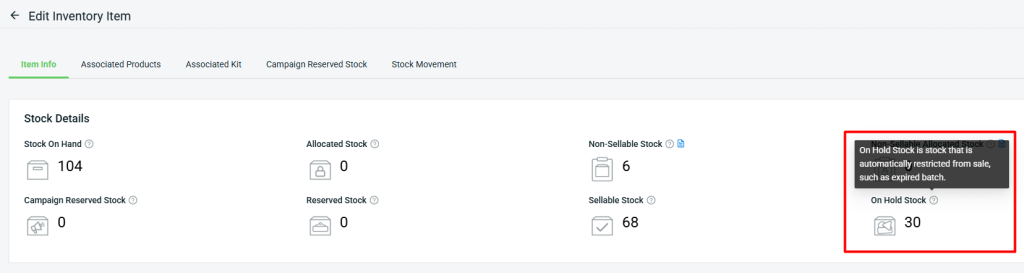
Keeping track of items with expiry dates can be challenging, especially when managing large inventories. To simplify this, we’re introducing the new “On Hold Stock” feature in Inventory Item, which automatically restricts expired batches from being sold — ensuring your inventory records stay precise and reliable.

i. How the On Hold Stock Works
For example, if today is 14/10/2025, any item batch that expires on 14/10/2025 will be automatically put on hold by the system at 12:00 AM.

NOTE: The On Hold action can only be performed automatically by the system. If you manually set the expiry date to today’s date or any earlier date, the batch will not be automatically placed on hold.

ii. What Happens When Item Batches Become On Hold?

a. Sellable Stock Deduction
When an item batch becomes On Hold, its quantity will be deducted from Sellable Stock, preventing further sales. The deducted quantity will then be added to On Hold Stock.
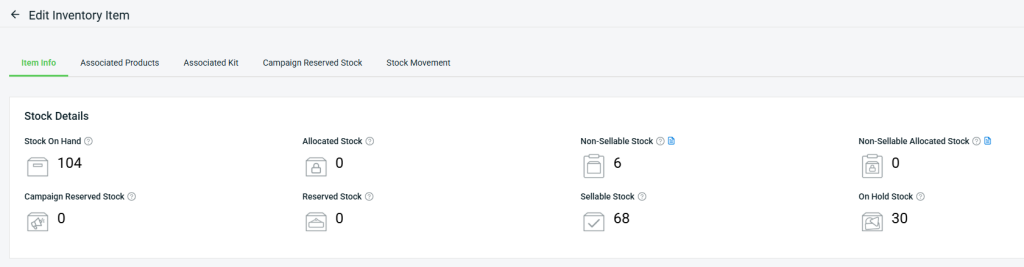
Sellable Stock (68) = Stock On Hand (104) – Non-Sellable Stock (6) – On Hold Stock (30)

b. Smart Fulfillment & Pick List Behavior
Expired On Hold batches will not be recommended in the Smart Fulfillment App or Pick List. The system will instead show the next available batch from the highest priority rack within the picking zone. If none are available, it will move to the next rack in sequence, keeping the expired batch last in line.
For Example:
Inventory Item Details – Fruit Drink – Orange
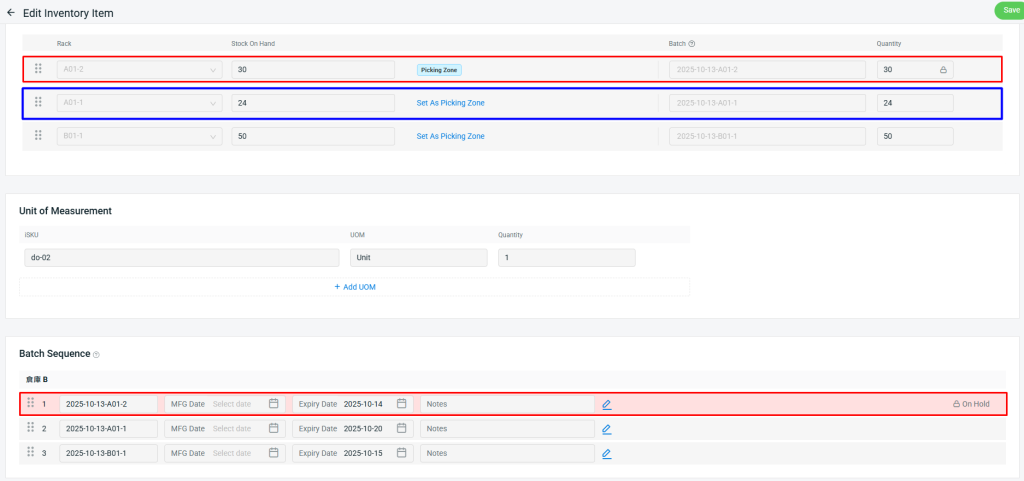
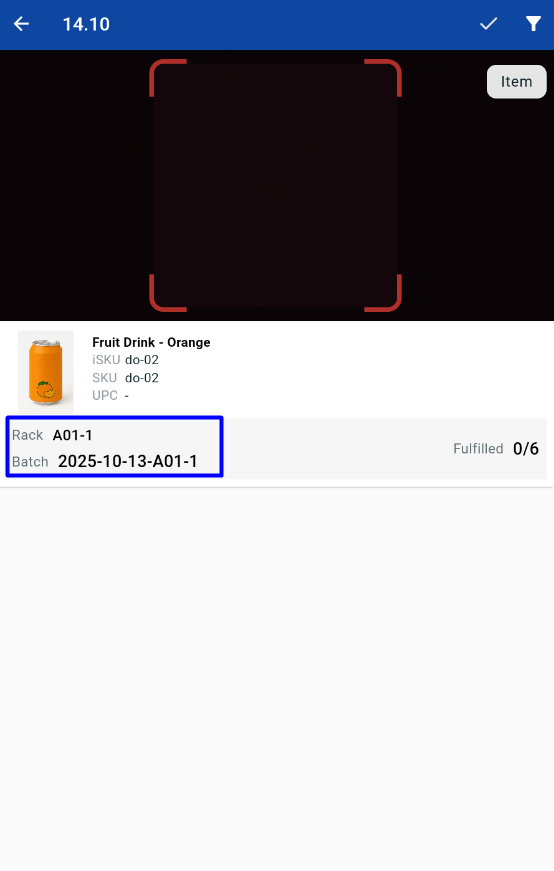
The picking zone for this item is Rack A01-2, and since the batch 2025-10-13-A01-2 has expired, the system will automatically show Rack A01-1, which is the highest priority rack with available batch quantity.
c. Stock Deduction Priority:

Picking Zone > Rack Sequence > Batch Sequence

On hold expired batch will always have the least priority, even if it is under picking zone rack or under higher rack / batch sequence.

2. [Fulfillment] New 'B2B Order Fulfillment Assistant' Simplifies B2B Packing with Flexible Shipment Splitting
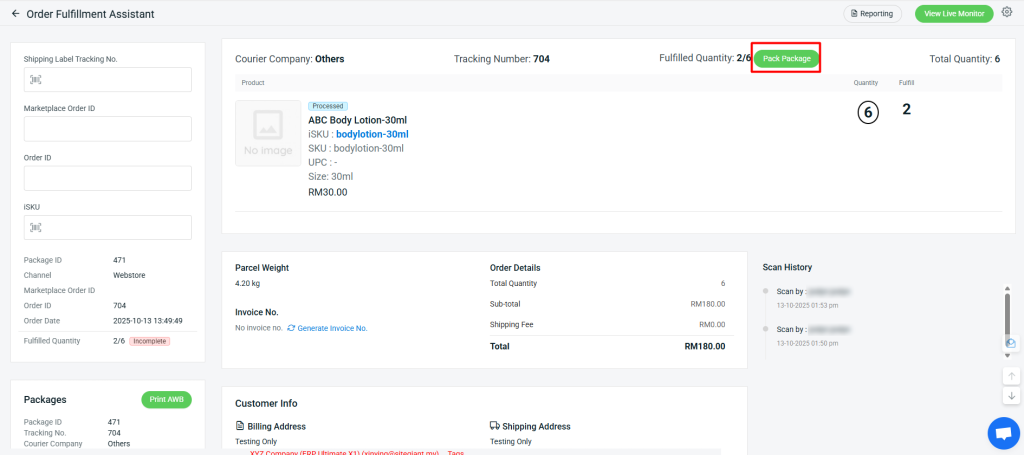
We’re excited to introduce our latest feature – the B2B Order Fulfillment Assistant, designed to streamline your B2B packing process. With this enhancement, you can now split shipments directly in the Order Fulfillment Assistant (OFA) even after shipments have been arranged.
This feature currently supports Webstore, Client Channel, SitGiant POS, Open API, Social Commerce, Shopping App and WooCommerce Order.
How It Works
Example: 
An order contains 6 items in total, and each box or parcel can pack a maximum of 2 items.
1. When you scan 2 quantities of the items, the system will trigger a “Pack Package” button.

2. Click the “Pack Package” button, then enter a new tracking number and courier company. You may reuse the same tracking number and courier if necessary.
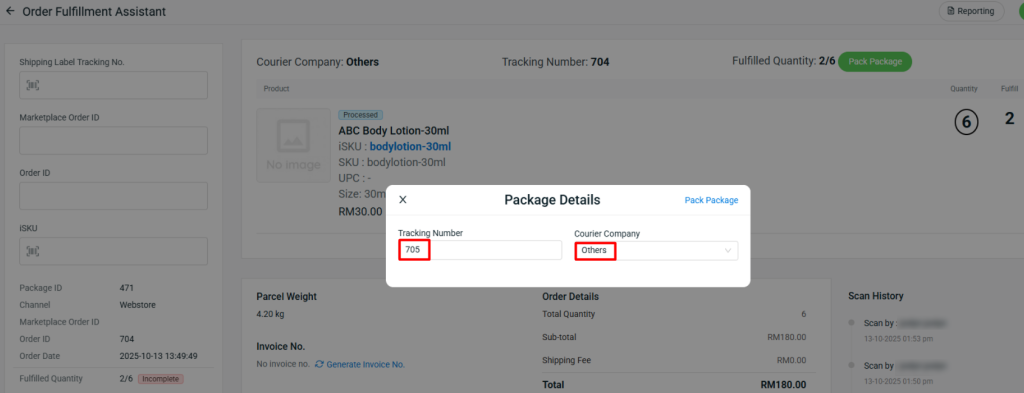
3. The 2 scanned items will be packed into a new package with the assigned tracking number and courier company.
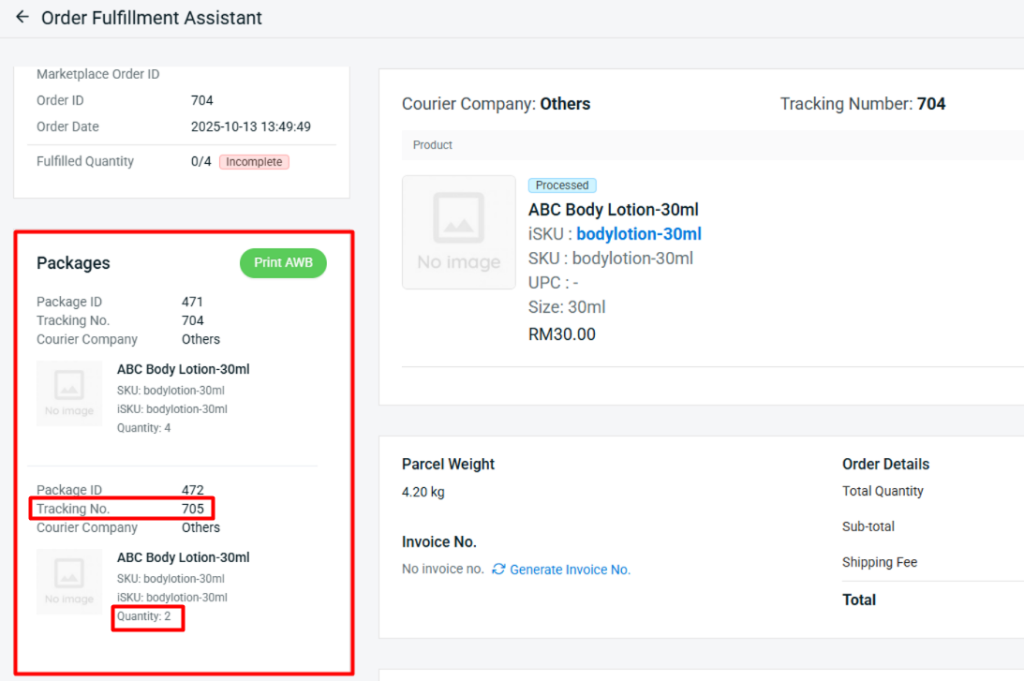
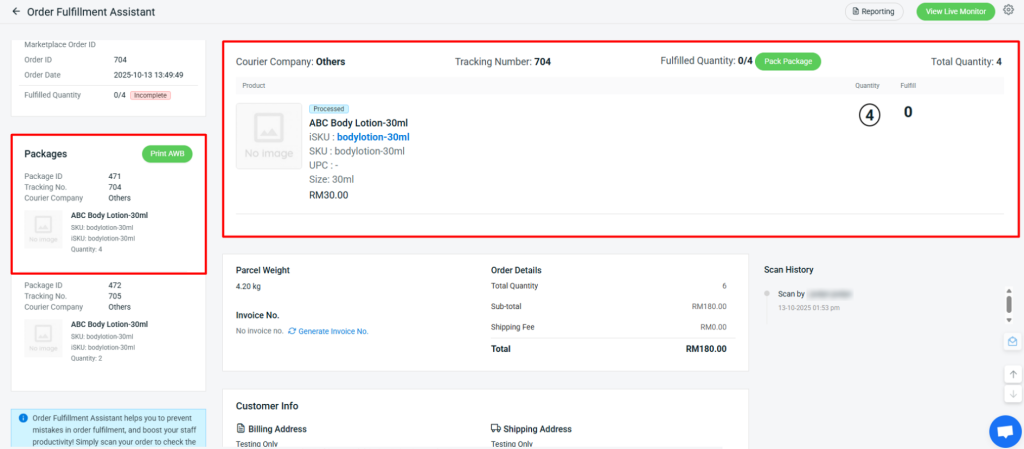
4. The remaining items will stay in the original package until they are scanned and packed into another box or parcel.
3. [Fulfillment] New 'Picking Bin' Feature Boosts Warehouse Picking Efficiency

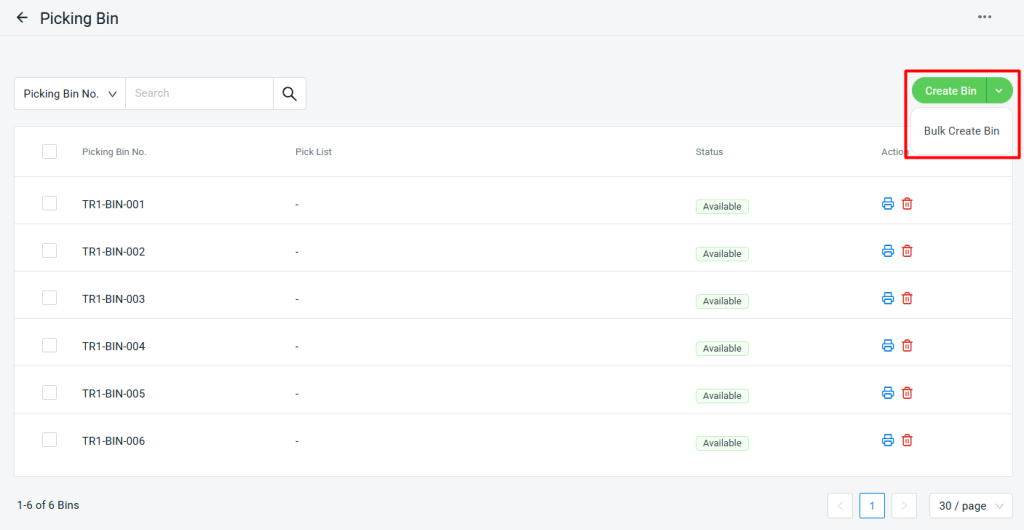
We’re glad to introduce the new Picking Bin feature, which allows you to create unique codes for each picking bin. This helps prevent order mix-ups between trolleys and ensures full traceability throughout the picking and packing process.
 
📌Note: This Picking Bin function is only applicable for orders that are fulfilled using Smart Fulfillment Mode 2.
i. You can create bins individually or in bulk by setting a prefix and quantity.

4. [Marketing Center] New 'Membership & Group Pricing' Lets You Set Special Product Prices by Membership Tier
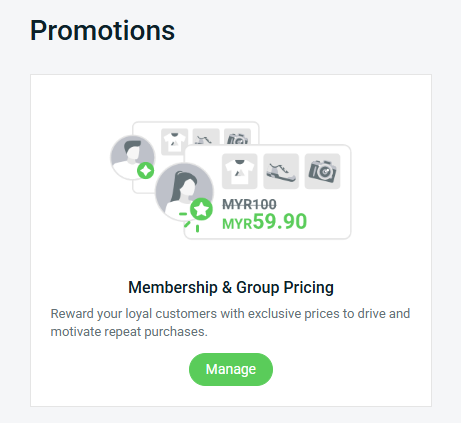
Membership plays a vital role in building a successful business. It strengthens the connection between your brand and your customers, encouraging loyalty and long-term engagement. With flexible pricing options, you can now set special product prices based on either customer groups or membership tiers — giving you greater control to reward loyal customers and tailor your pricing strategy for maximum impact.
Remark:
The Membership & Group Pricing feature was previously known as Customer Group Pricing.
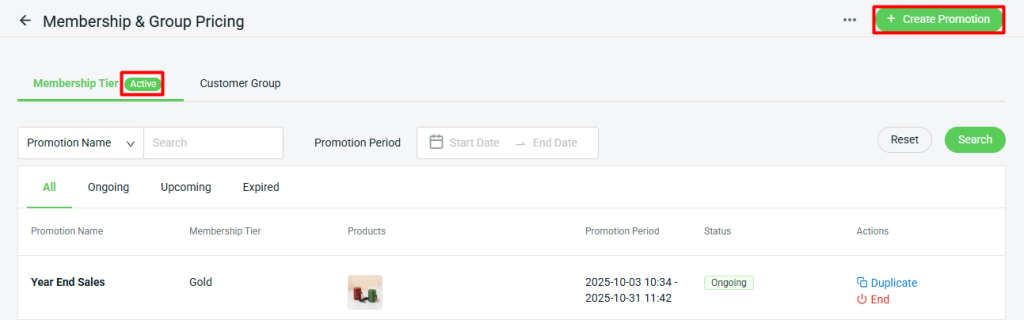
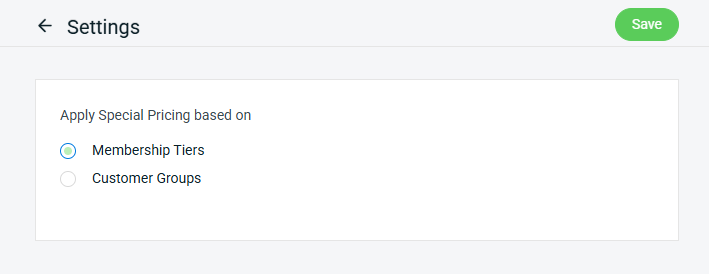
1. Before setting up the pricing, choose whether to apply it based on either Customer Groups or Membership Tiers.
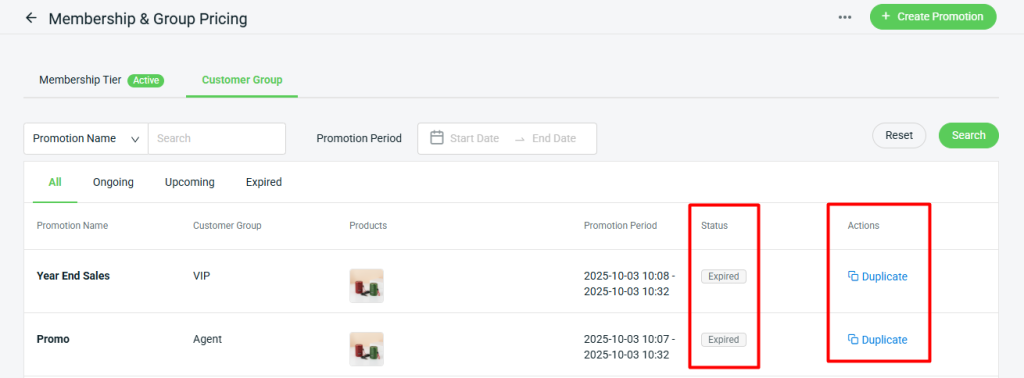
2. Once you switch this setting, any ongoing or upcoming promotions will be automatically marked as expired. You will then need to create or duplicate promotions under your selected option — Customer Groups or Membership Tiers.

5. [App] New 'Microsoft Dynamics 365 Sync' Enables Effortless Transfer of Order Data

We’re glad to introduce the new Microsoft Dynamics 365 Sync feature, which enables you to seamlessly sync your ERP orders with Microsoft Dynamics 365 Business Central (D365 BC), ensuring accurate records and streamlined business workflows.
Key Functions:
  • Sync ERP order to D365 BC as Sales Order
  • Item, Customer, and Shipping Matching
  • D365 settings page for Sales Order Preset & API Sync

Essential Feature Enhancements You Need to Check Out

September 2025

1. [Inventory] Flexibly Adjust Stock Push Quantity with 'Stock Sync Rule'
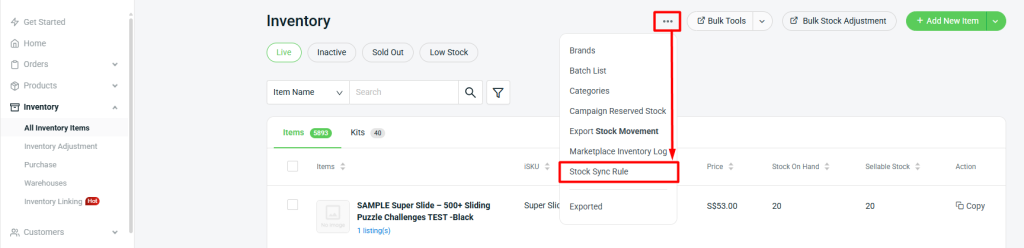
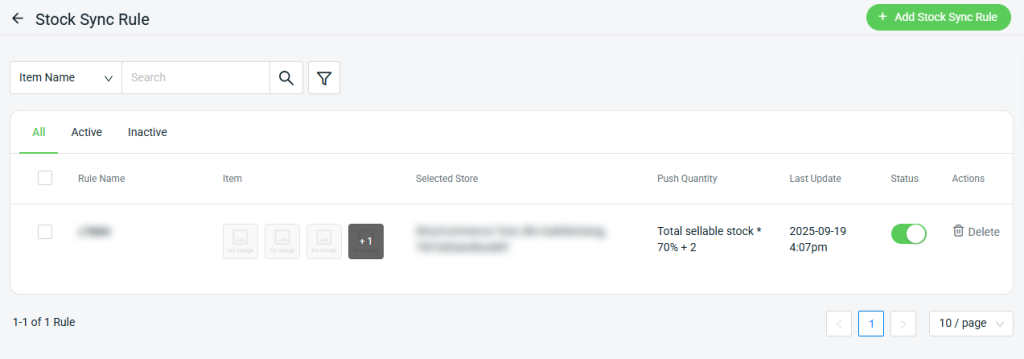
You can now adjust stock push quantity by percentage and add virtual stock for a group of items that sync across multiple marketplaces. With this latest enhancement, you’ll enjoy more flexibility and precision in managing your stock levels — ensuring smoother operations, reduced overselling, and better control across all your sales channels.
Formula:
Sellable Stock × Percentage (%) + Virtual Stock = Actual stock synced to marketplaces
Stock Sync Flow:
Here’s the new priority sequence:
(i) Smart Stock Sync – If enabled, stock will be allocated based on our algorithm.
(ii) Stock Sync Rule – If Smart Stock Sync is not turned on, we’ll use the stock rules you’ve set.
(iii) Sales Channel Settings – If neither is set, stock will sync according to each sales channel’s settings.

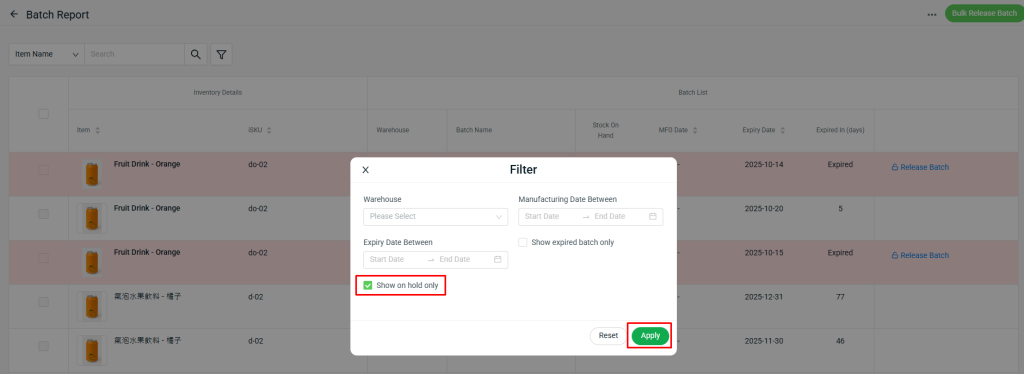
2. [Inventory] Easily Manage On-Hold Stock by Performing Adjustments or Releasing It

The On Hold Stock feature automatically restricts items from being sold, such as those with expired batches. Once you have on-hold stock, you can manage it by either performing a Stock Adjustment or Releasing the stock.
1. Stock Adjustment
 
On the inventory item page, click the Stock Adjustment icon to perform an adjustment. When you adjust on-hold stock, the updated quantity will be reflected in the On Hold Stock column.

2. Release Stock

a. From Inventory Item Page
You can release stock directly from the Inventory Item page by clicking the “Release” button. Once released, the on-hold stock quantity will be added back to Sellable Stock, and removed from the On-Hold Stock section.
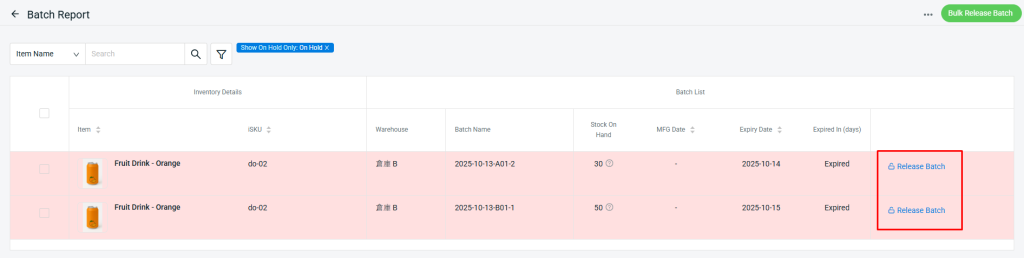
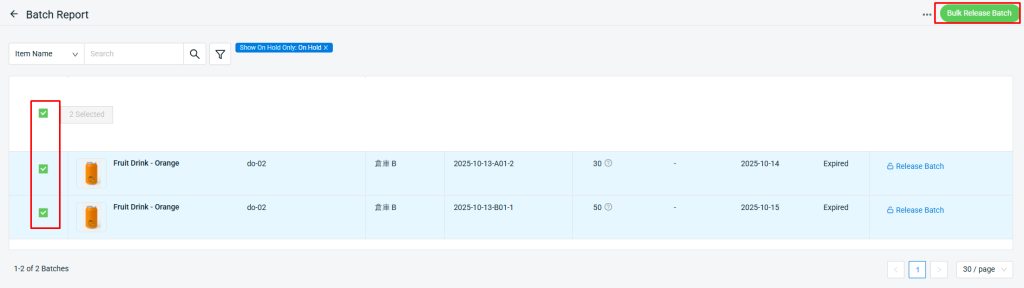
b. From Batch Report
 
Alternatively, you can release stock via the Batch Report.
If multiple batches of on-hold stock are available, you may perform a Bulk Release Batch action.

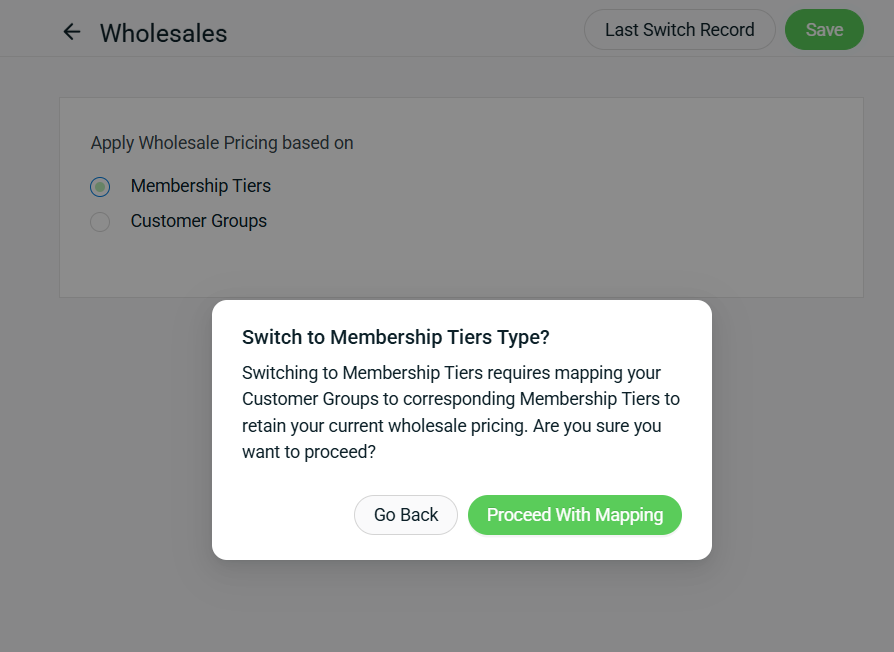
3. [Webstore Listing] Wholesale Pricing Can Now Be Applied Based on Membership Tiers
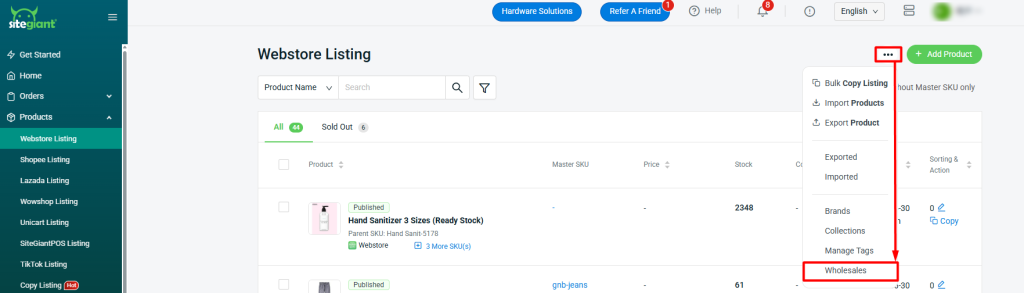
Managing wholesale prices just got more flexible! You can now apply wholesale pricing based on either membership tiers or customer groups. This enhancement helps you create more personalized pricing strategies and strengthen member loyalty.
Remark: Wholesale pricing can only be applied to one option at a time — either membership tiers or customer groups.
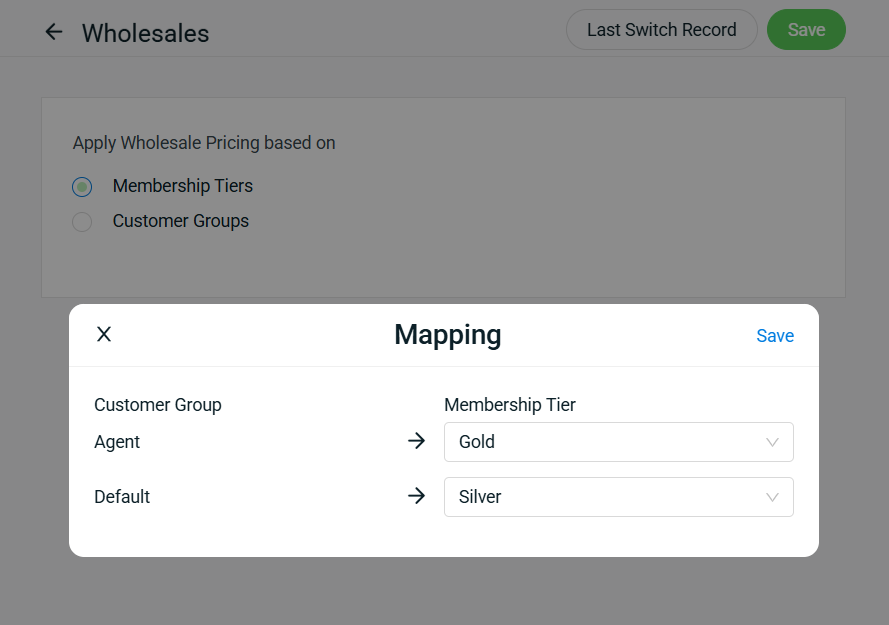
For merchants who wish to switch existing wholesale prices from customer groups to membership tiers, there’s no need to recreate the wholesale prices manually. Simply map your customer groups to the corresponding membership tiers to retain your current wholesale pricing.
This Wholesale Pricing by Membership Tiers feature is now supported across Webstore, SiteGiant POS, Shopping App and Smart Salesman App.

4. [Webstore] Freely Choose Whether to Show or Hide Blog Post Author Name
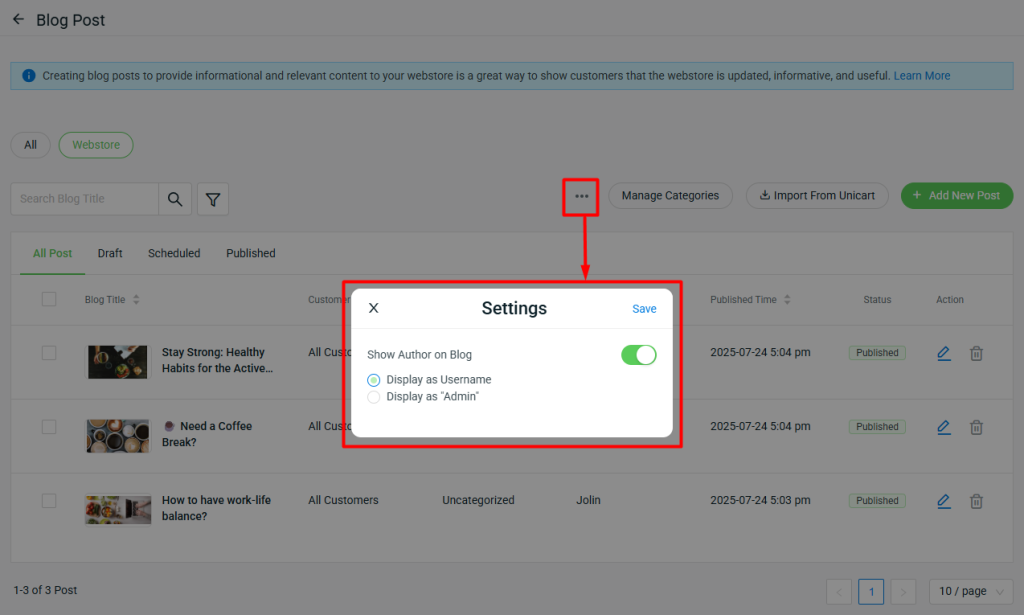
Previously, the Author Name on every blog post was fixed — which could limit how you present your content publicly.
With this latest update, you now have the flexibility to decide whether to Show or Hide the blog post Author Name. Choose to display it as your “Username” or simply as “Admin”, depending on how you want your blog to appear to your readers.

5. [Webstore] Gain the Ability to Control Which Customer Groups Can View Your Blog Posts
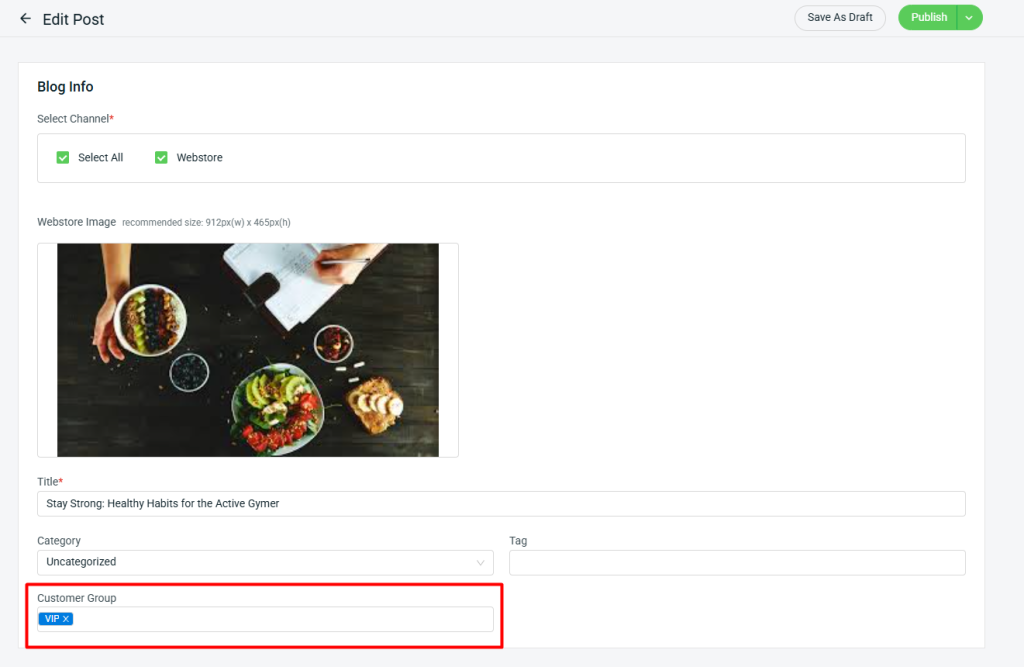
Deliver the right message to the right readers. With this update, you can now decide which customer groups are allowed to view your blog posts — enabling you to share more targeted, relevant, and impactful content with each audience segment.
*Remark:
i. If the customer group field is left empty, the blog post will be visible to all customers.
ii. This setting applies only to the Webstore channel. Customer Group cannot be set when the Shopping App channel is selected.

6. [SQL Accounting] Control Shipping Fees in Sales Invoice Sync for SQL Accounting
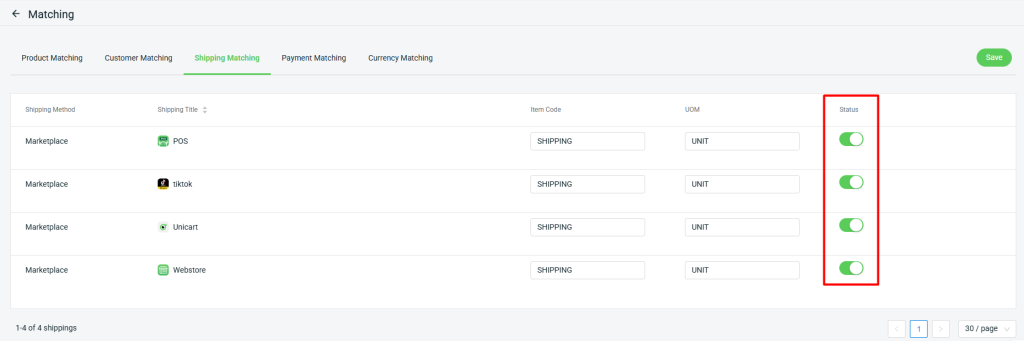
As part of the latest enhancement, we’ve introduced a new “Status” setting that allows you choose whether to include the shipping fee line item when syncing Sales Invoices to SQL Accounting. This improvement provides greater flexibility in managing your order records according to your business needs.

7. [SiteGiant POS] Added Support for a New Printer Model
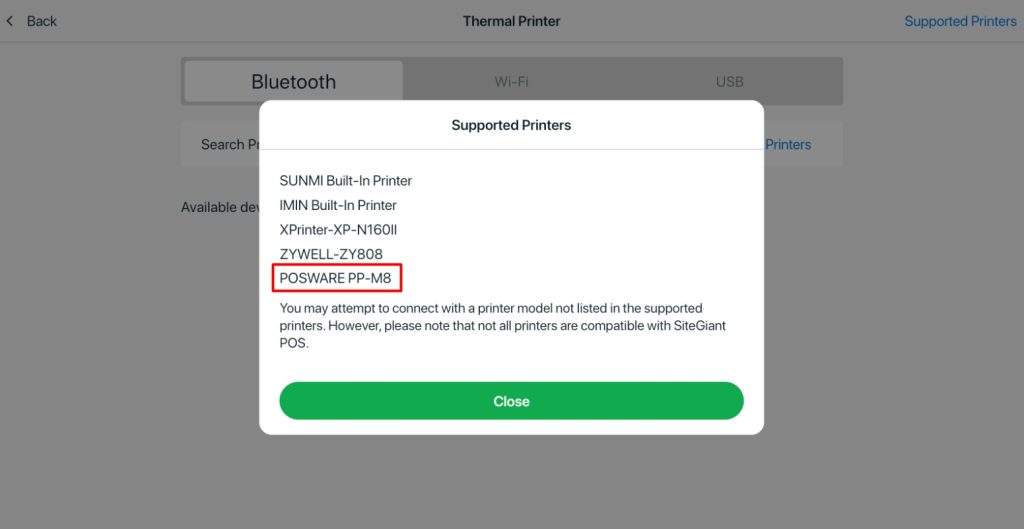
As part of the latest enhancement, SiteGiant POS now supports the POSWARE PP-M8 printer model, providing greater compatibility and flexibility for your Point-Of-Sale operations.
*Reminder: Please be reminded to update to the latest version (V1.6.51)

October 2025

1. [Webstore] New Email Notifications for Orders Ready for Pickup
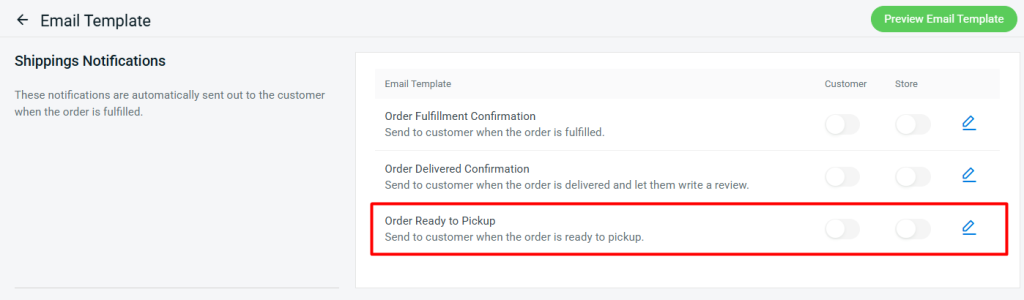
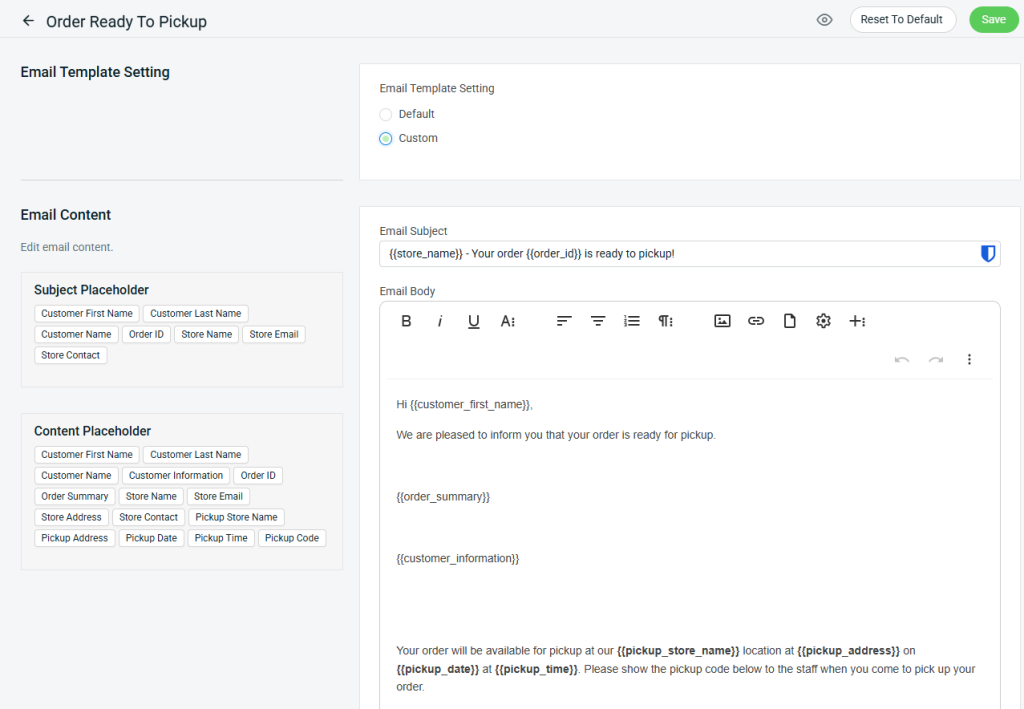
With the latest enhancements, when a pickup order is marked as “Ready to Pickup”, the ERP system will automatically send the “Order Ready to Pickup” email notification to remind customers to collect their orders.
Email Template Setting
You may use the default email template or customize it according to your preference.
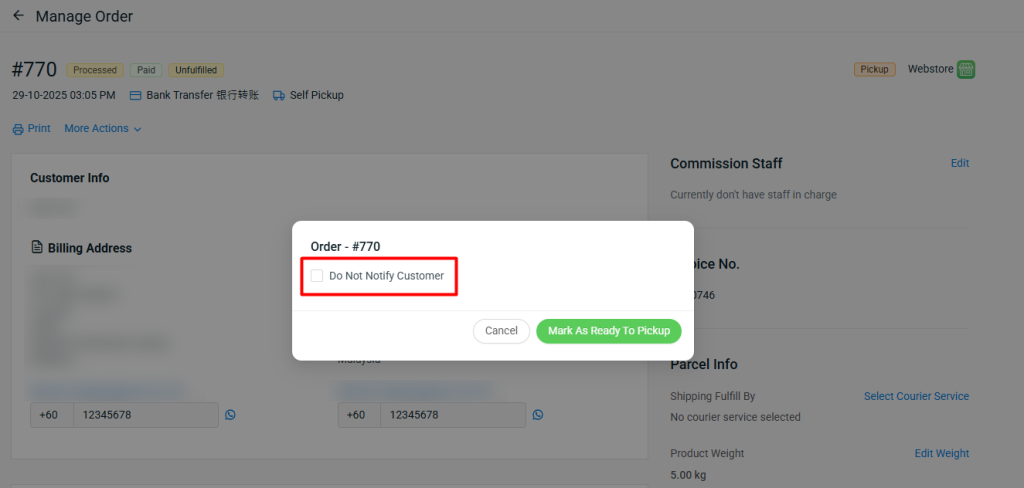
i. On the Order Detail page, when an order is marked as “Ready to Pickup”, you can choose whether to notify the customer. If you do not wish to send a notification, enable “Do Not Notify Customer”.
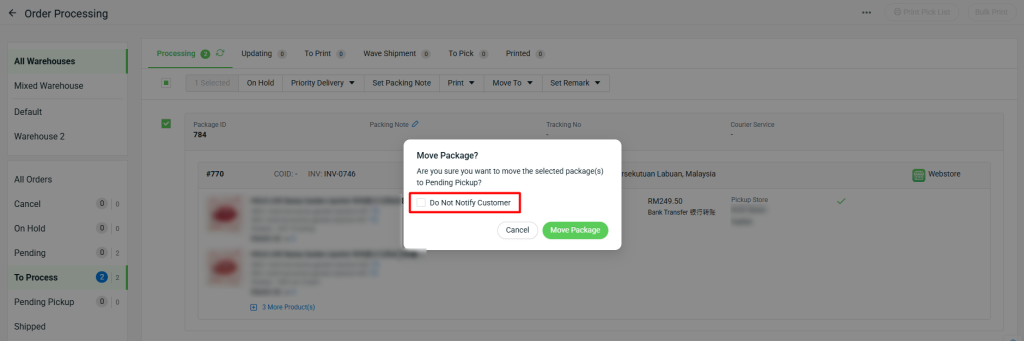
ii. On the Order Processing Page, when an order is move to “Pending Pickup”, you can choose whether to notify the customer. If you do not wish to send a notification, enable “Do Not Notify Customer”.

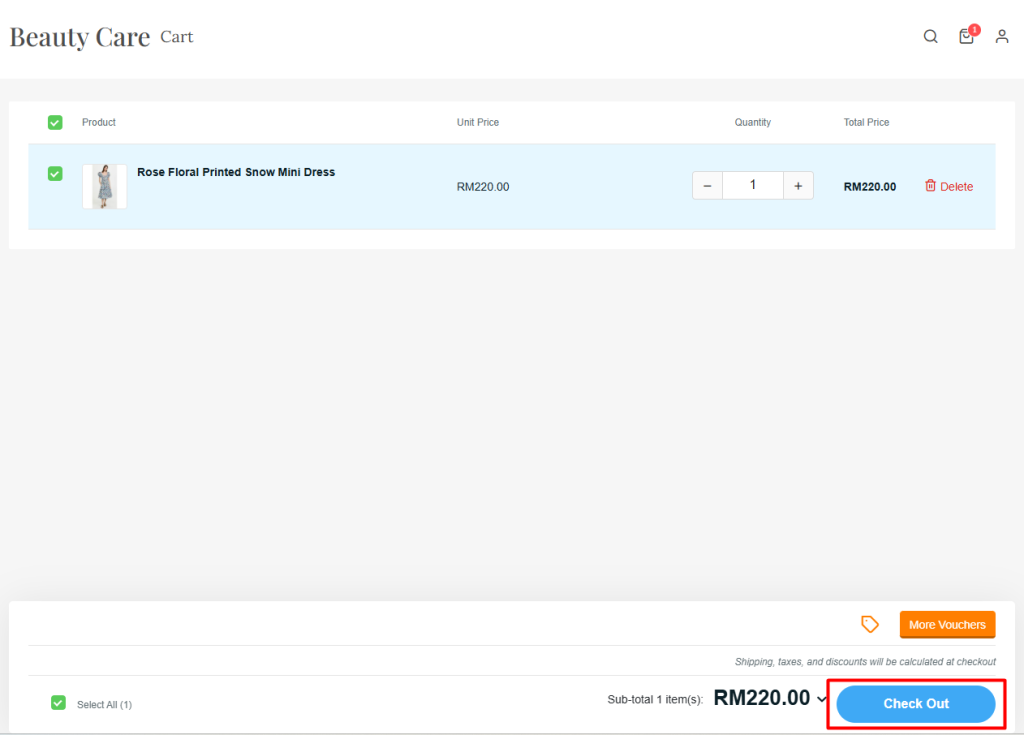
2. [Webstore] Customize Webstore Button Colors to Match Your Brand
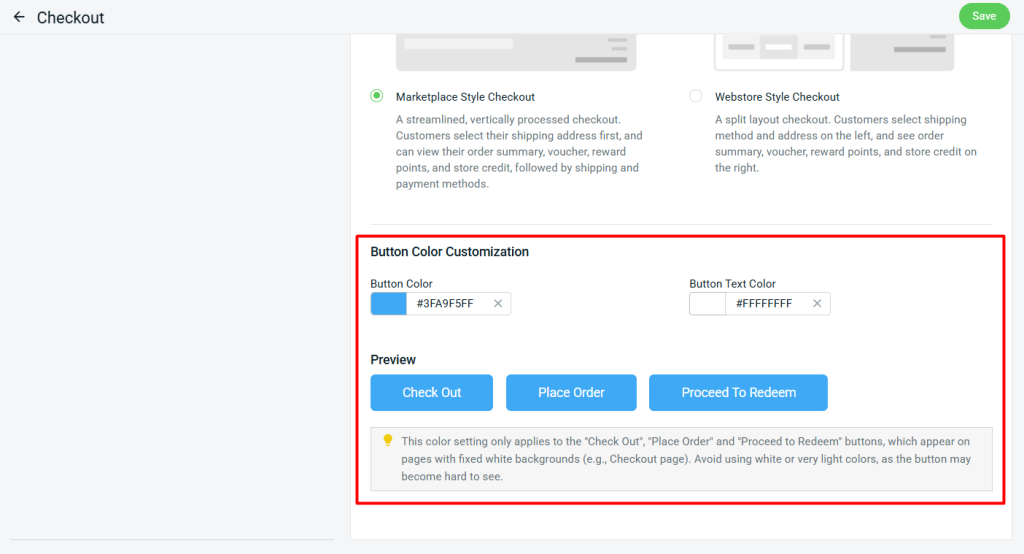
With the latest enhancements, you can now customize the button colors for your webstore. This setting applies specifically to the ‘Check Out’, ‘Place Order’, and ‘Proceed to Redeem’ buttons, allowing you to match your store’s branding.
Example of Webstore Preview

3. [Xero Sync] Control Shipping Fees in Sales Invoice Sync for Xero Accounting

With the latest enhancements, we’ve enhanced the Xero Sync function to provide better control and a smoother workflow.

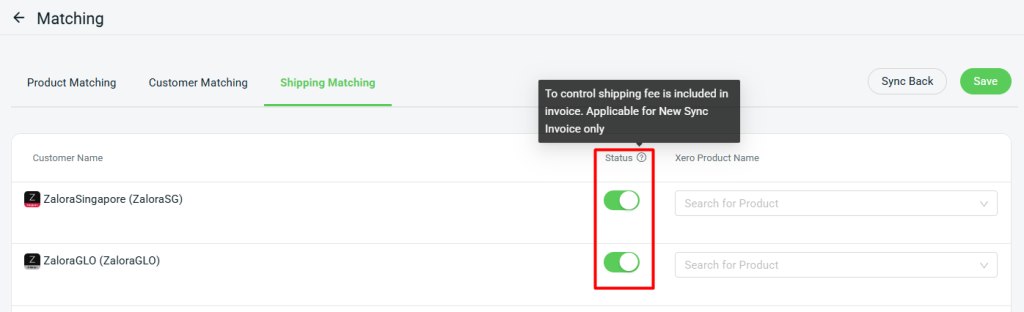
1. A new “Status” column has been added in Shipping Matching, allowing you to control whether to sync the order’s shipping fee to Xero.
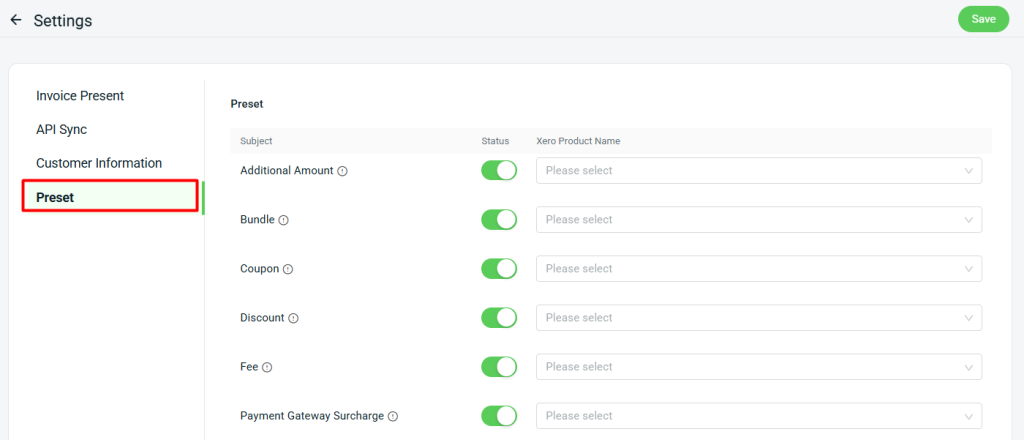
2. A new “Preset” setting has been added, allowing you to control which order details are synced to Xero.
 
*Note: Shipping status for all channels and all Preset subjects statuses will be enabled by default.
Check out these new features in SiteGiant today, and stay tuned for more updates.
Terms and Conditions

1. The SiteGiant x Lalamove First Time 10% Top-Up Bonus Campaign (the “Promotion”) is provided by LALAMOVE MALAYSIA SDN BHD (COMPANY NO. 1277201-W) (“Lalamove”) and SiteGiant Sdn Bhd (“SiteGiant”). By participating in the Promotion by registering via this link: https://sitegiant.my/lalamove-integration and/or receiving the Bonus (as defined below), this indicates you understand and agree to be bound by these Terms.

2. You are eligible to participate in the Promotion and become an “Eligible Customer” if all of the following requirements are satisfied:

a. You have enrolled in the Promotion through the dedicated main landing page for the Promotion via this link: https://sitegiant.my/lalamove-integration (“the Form”) during the Promotion Period (as defined below);

b. You have become a registered corporate (prepaid settlement) account holder of Lalamove;

c. You have signed up as a new merchant of SiteGiant and you have been onboarded by SiteGiant following satisfaction of all requirements from SiteGiant during the Promotion Period;

d. You are a company incorporated in Malaysia with a valid business registration certificate; and

e. SiteGiant and Lalamove reserve the right to refuse any Eligible Customers their participation in the Promotion for any reason and without any prior notice.

3. If you are an Eligible Customer, you are eligible to a one-time fixed credit bonus equal to 10% of the amount first topped up, to be credited to your Lalamove corporate e-wallet account (the “Bonus”) if you successfully topped up at least RM 100 during at least one single transaction to your Lalamove corporate account (the “Transaction”).

4. This Promotion commences on 15th July 2022 with the end date to be announced at a later date (the “Promotion Period”).

5. If the Eligible Customer satisfies the Conditions in clause 3 of these Terms, the Bonus will be credited within 30 days immediately following the registration of your Lalamove corporate account.

6. The relevant top-up amounts in the Lalamove account have unlimited validity from the date of the successful top-up. The Bonus is subject to applicable agreements governing your Lalamove corporate account.

7. The relevant top-up amounts are not redeemable for cash or cash-out, for resale and no refund or exchange is permitted (except as required by applicable laws).

8. During the Promotion Period, in case of any fraud or abuse in respect to how the Bonus is awarded, Lalamove reserves the right to debit the Bonus from the Eligible Customer’s Lalamove corporate account without prior notice.

9. The Bonus cannot be earned in conjunction with other offers, packages or promotions as may be launched by Lalamove from time to time, unless specified by Lalamove. The Bonus cannot be transferred to third parties or other accounts, or exchanged for any other gifts, returned or exchanged for other products with respect to Lalamove.

10. SiteGiant and Lalamove reserve the right to amend, and/or vary any of these Terms and any arrangement of this Promotion, limit, suspend, cancel, and/or terminate the Promotion, without notice and without any liability.

11. In addition:

a. General terms and conditions of Lalamove would all apply (https://www.lalamove.com/en-my/terms-and-conditions).

b. Lalamove will process the collected data and personal information in accordance with Lalamove’s privacy policy (https://www.lalamove.com/en-my/privacy-policy).

c. By participating in the Promotion, you expressly consent that any personal information that you provide, may be shared between SiteGiant and Lalamove for purposes of the Promotion and all related administrative actions in connection therewith.

12. These Terms are governed by the law of Malaysia. In case of any dispute, SiteGiant and Lalamove reserve the right of final decision.

13. For any enquiries:

Related to SiteGiant, please contact [email protected]

Related to Lalamove, please contact [email protected]

Terms and Conditions

1. This promotion availability will be based on first come, first served basis.
2. This promotion is not applicable for renewal usage.
3. This promotion is valid for new signups only.
4. Duration of this free subscription offer is 3 + 12* months (*T&C apply).
5. Free 3 months subscription from SiteGiant and 12 months subscription from Government subsidy campaign (subject to availability).
6. SiteGiant reserves the right to change these terms and conditions at any time without prior notice.